Topology Selection and Exploration
Topology is the structure of build123d geometric features, and traversing the topology of a part is often required to specify objects for an operation or to locate a CAD feature. In a GUI you would click on a feature; in code you describe it. That description has three parts:
a selector names the kind of feature - vertices, edges, wires, faces or solids - and returns them all in a
ShapeList;operators sort, group and filter that list, or slice it like any Python list, until what remains is the feature you meant;
criteria are what the operators sort, group and filter by.
Criteria come in three kinds, and keeping them apart makes selectors easier to write:
What a feature is. Its own geometry: the type of curve or surface, its length, area, radius or volume, which way it points, where it lies. These are properties of the feature alone and can be measured with nothing else in hand.
How a feature sits in its shape. Whether an edge is a convex or concave corner of the solid, which faces are its neighbours, which face a vertex was picked off. These are relations, not properties: the same straight edge is convex on a box and concave at the inner corner of an L, and nothing about the edge itself says which.
When a feature came to be. Whether the last operation created it, brought it in, or only rebuilt it. This is the feature’s history, and it is what makes “fillet the edges I just made” possible.
Selectors
Selectors extract all of a feature type from the referenced object, or the subset the
last operation is responsible for. They are available on every Shape and on every
builder, and return a ShapeList, a subclass of list that the Operators
refine.
Selector |
Applicability |
Description |
|---|---|---|
any |
|
|
any |
|
|
any |
|
|
any |
|
|
any |
|
Every selector takes a Select argument, Select.ALL by
default. Select.LAST and Select.NEW narrow the result to what the last
operation did, and are described under when a feature came to be.
# In context
with BuildSketch() as context:
    Rectangle(1, 1)
    context.edges()

    # Build context implicitly has access to the selector
    edges()

# Taking the sketch out of context
context.sketch.edges()

# Create sketch out of context
Rectangle(1, 1).edges()
A ShapeList has the same selectors, so a selection can be narrowed in steps: the
edges of the smallest faces are part.faces().group_by(SortBy.AREA)[0].edges().
Operators
Operators refine a ShapeList of features isolated by a selector. They sort, group or
filter and return a modified ShapeList, or in the case of group_by() a GroupBy, a
list of ShapeList objects accessible by index or key.
Method |
Criteria |
Description |
|---|---|---|
|
Sort |
|
|
Sort |
|
|
Group |
|
|
Filter |
|
|
Filter |
The most common operators also have a shorthand, so a selection can read as a chain:
Operator |
Operand |
Meaning |
Example |
|---|---|---|---|
|
|
|
|
|
|
|
|
|
|
|
|
|
|
|
|
|
|
|
|
|
Python indexing and slicing |
|
Sort
A ShapeList can be sorted with the sort_by() and sort_by_distance() methods. Sorting
is a critical step when isolating individual features, as a ShapeList from a selector
is unordered.
Here we want to capture some vertices from the object furthest along X: all the
vertices are first captured with the vertices() selector, then sorted by Axis.X.
Finally, the vertices can be captured with a list slice for the last 4 list items, as the
items are sorted from least to greatest X position. Remember, ShapeList is a
subclass of list, so any list slice can be used.
part.vertices().sort_by(Axis.X)[-4:]

Examples


Group
A ShapeList can be grouped and sorted with the group_by() method. Grouping is a great
way to organize features without knowing the values of specific feature properties.
Rather than returning a ShapeList, group_by() returns a GroupBy, a list of
ShapeList objects sorted by the grouping criteria. GroupBy can be printed to view
the members of each group, indexed like a list to retrieve a ShapeList, and accessed
by key with the group method. If the group keys are unknown they can be discovered
with key_to_group_index.
If we want only the edges from the smallest faces by area we can get the faces, then
group by SortBy.AREA. The ShapeList of smallest faces is available from the first
list index. Finally, a ShapeList has access to selectors, so calling edges() will
return a new list of all edges in the previous list.
part.faces().group_by(SortBy.AREA)[0].edges()

Examples


Filter
A ShapeList can be filtered with the filter_by() and filter_by_position() methods.
Filters are a flexible way to isolate (or exclude) features based on known criteria.
Let’s say we need all the faces with a normal in the +Z direction. One way to do this
might be with a list comprehension, however filter_by() can take a lambda function as a
filter condition on the entire list. In this case, the normal of each face can be checked
against a vector direction and filtered accordingly.
part.faces().filter_by(lambda f: f.normal_at() == Vector(0, 0, 1))

Because filter_by() accepts any callable, a filter on any combination of properties
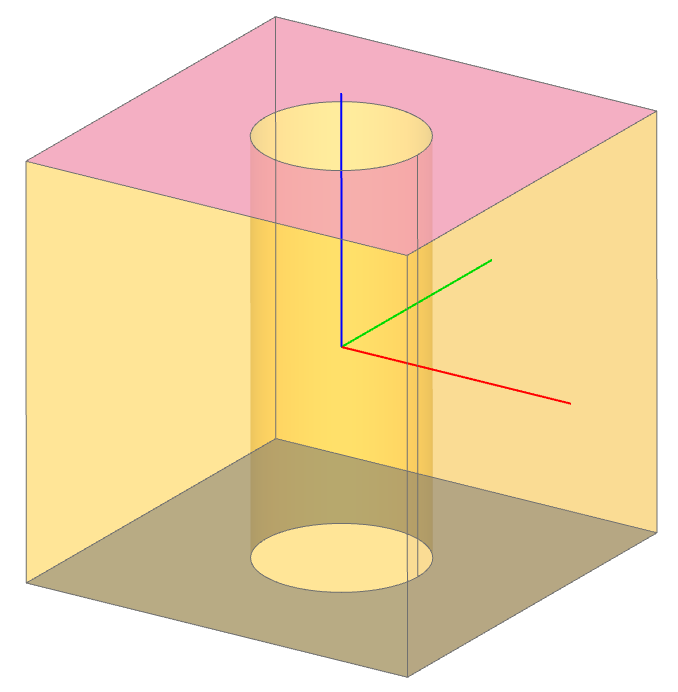
fits into a fluent chain. Here the two faces with inner wires, that is with holes, are
selected regardless of their orientation:
obj = Box(1, 1, 1) - Cylinder(0.2, 1)
faces_with_holes = obj.faces().filter_by(lambda f: f.inner_wires())
Standard Python tools work too. sorted, filter and comprehensions all accept a
ShapeList, which is useful when a selection needs several properties at once:
outside_vertices = filter(
    lambda v: (v.Y == 0.0 or v.Y == height)
    and -overall_width / 2 < v.X < overall_width / 2,
    din.vertices(),
)
Examples


Criteria
The operators above take criteria of three kinds. Any operator can take any kind; the kinds differ in what they need to answer.
What a feature is
The first kind describes the feature alone. Nothing but the feature is needed to evaluate them, and they are the criteria most selectors start with.
Type:
GeomTypenames the curve or surface -LINE,CIRCLE,PLANE,CYLINDERand so on.part.edges().filter_by(GeomType.CIRCLE)keeps the circular edges;geom_typeis the property behind it.Size:
SortByorders byLENGTH,RADIUS,AREA,VOLUMEorDISTANCE; the propertieslength,radius,areaandvolumecan be passed tosort_by(),group_by()andfilter_by()directly.Direction: an
Axispassed tofilter_by()keeps the planar faces whose normal, or the linear edges whose direction, is parallel to it; aPlanekeeps those parallel to the plane. Passed tosort_by()orgroup_by(), anAxisorders by position along it.Position:
filter_by_position()keeps features within a range along an axis, andsort_by_distance()orders by distance from a point or another shape.Anything else the feature can say about itself, through a property or a callable:
Face.is_planar,Edge.is_closed,lambda f: len(f.inner_wires()) == 1.
How a feature sits in its shape
The second kind describes the feature’s relationship to the shape it was selected from: which face a vertex is a corner of, whether an edge is a crease that turns inward or outward, which faces neighbour which. None of these can be read from the feature alone, so all of them depend on the route the feature was selected by.
Selection route
A shape pulled out of another remembers where it came from. Every selector step
is recorded on the result as topo_path, a tuple running from the outermost
shape to the one it was taken directly out of:
face = box.faces().sort_by(Axis.X)[-1]
edge = face.edges().sort_by(Axis.Y)[0]

edge.topo_path      # (box, face)
edge.topo_parent    # box - where the selection started
edge.topo_owner     # face - what the edge was picked off
topo_parent is the first step and topo_owner the last, so on a single
selection they are the same shape. The distinction matters when a selector
narrows twice: an edge belongs to two faces of a solid, and only the route it
was selected by says which one was meant. Selecting the edge straight off the
solid records no face, so an operation that needs one has to say so rather than
guess.
Provenance is metadata rather than geometry. It is carried by reference through copies, since it names shapes outside the copy, and it is not part of shape equality.
Convexity
A vertex, edge or face can be classified by how the material of the shape it was
selected from sits around it, with Convexity:
CONVEX- the material closes around the element by less than half a turn: the outer edge of a box, the corner of a plate, a bossCONCAVE- by more than half a turn: the inner corner of a pocket, a holeSMOOTH- the boundary passes through without bending: a fillet seam, a planar face, a vertex where two edges meet in lineSADDLE- both senses are present: an edge whose dihedral angle crosses half a turn along its length, a vertex where convex and concave edges meet, a face with principal curvatures of opposite sign
This is a relationship, not a property. The same straight edge is convex on a box and
concave at the inner corner of an L, and nothing about the edge itself distinguishes
them. Every shape has a convexity property, filter_by() takes a member of the enum,
and group_by() takes the enum itself:
with BuildPart() as tray:
    Box(20, 20, 5)
    offset(amount=-2, openings=tray.faces().sort_by(Axis.Z)[-1])
    fillet(tray.edges().filter_by(Convexity.CONCAVE), 1.5)
    fillet(tray.edges().filter_by(Convexity.CONVEX), 0.5)

inside_fillets = tray.faces().filter_by(Convexity.CONCAVE)
by_kind = tray.edges().group_by(Convexity)
Because the classification is relative to the shape the element came from, the
selection route decides the question being asked. A vertex taken through a face,
as face.vertices() does, is a corner of that face and is classified by the
turn of the face’s boundary there; the same vertex taken straight off the solid is
classified by the creases meeting at it. The inner corner of a cross is concave on
the top face but a saddle on the solid, where two convex edges meet a concave one.
An edge is classified between the two faces of the shape it was selected from, so
an edge of a lone face, or of an open shell’s rim, has no crease to classify and
raises rather than guessing.
Edge.is_interior, Face.is_circular_convex and Face.is_circular_concave
are shorthand for the concave and convex cases.
Topological distance
topo_distance_to() creates a callable key that measures graph distance through
topology rather than geometric distance through space. It is useful when selecting
features by adjacency, for example faces connected to a reference face, or the next
ring of faces after that.
Distances are measured within the shared topo_parent of the reference shape. The
reference shape has distance 0, directly adjacent shapes have distance 1, and
unreachable shapes have distance inf.
box = Box(1, 1, 1)
faces = box.faces()
top_face = faces.sort_by(Axis.Z)[-1]

face_rings = faces.group_by(topo_distance_to(top_face))

top = face_rings[0]
sides = face_rings[1]
bottom = face_rings[2]
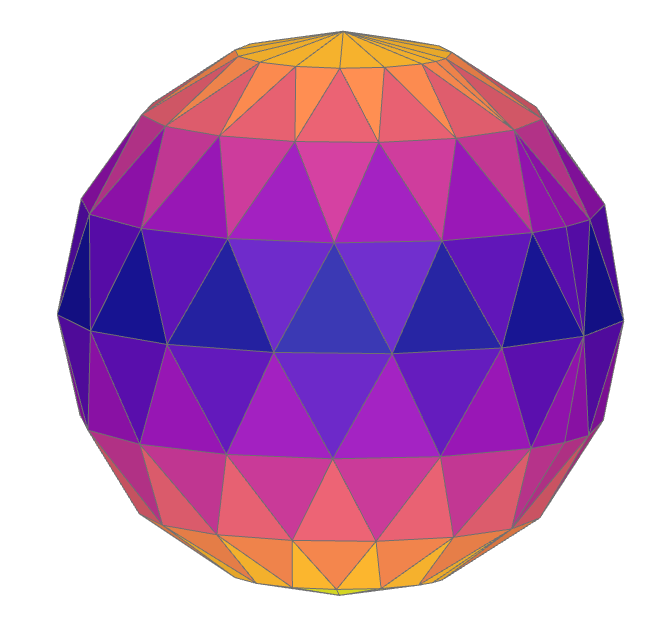
Multiple reference shapes can be provided. This is useful for selecting all features within a topological distance from any reference. In this example, a sphere is converted to a triangular mesh, faces near the middle of the mesh are used as references, and all mesh faces are grouped into topological rings expanding away from that starting band.
from build123d import *
from pathlib import Path
from tempfile import TemporaryDirectory

from ocp_vscode import ColorMap, show

mesher = Mesher()
mesher.add_shape(Sphere(1), linear_deflection=0.05, angular_deflection=1)

with TemporaryDirectory() as tmp_dir:
    mesh_path = Path(tmp_dir) / "sphere.stl"
    mesher.write(mesh_path)
    mesh_sphere = Mesher().read(mesh_path)[0]

sphere_faces = mesh_sphere.faces()

vertical_groups = sphere_faces.group_by(Axis.Z)
starting_ring = vertical_groups[len(vertical_groups) // 2]
face_rings = sphere_faces.group_by(topo_distance_to(starting_ring))

show(*face_rings, colors=ColorMap.listed(len(face_rings)))
The same approach can be used with edges or vertices. For example, a single edge on the mesh can be used as the starting point for edge-distance rings.
sphere_edges = mesh_sphere.edges()
reference_edge = choice(sphere_edges)
edge_rings = sphere_edges.group_by(topo_distance_to(reference_edge))
When a feature came to be
The third kind is history. Every operation - a boolean, a fillet, a chamfer, a 2D
fillet, a join of connected edges - keeps a record of what it did to the sub-shapes of
its inputs: which it left alone, which it rebuilt, which it created and which it
removed. The record travels with the shape the operation returns, and the selectors
read it through Select:
Select.ALL- every feature of the kind, the default;Select.LAST- the features the last operation brought in or created. A feature the operation merely rebuilt is not included: when a cylinder is fused onto a box the box’s top face gains a circular edge, but it is still the box’s top face, soSelect.LASTreturns the cylinder’s faces and not the top;Select.NEW- only the features that existed in no input in any form: the edges where two objects intersect, the faces of a fillet, the solid two solids merge into.
All three are available for every shape type, in builders and on shapes alike.
In a builder, the operations are the objects and operations run in the context, and the selectors are the builder’s own:
with BuildPart() as part:
    Box(5, 5, 1)
    Cylinder(1, 5)

    part.vertices()             # every vertex, the same as part.vertices(Select.ALL)
    part.faces(Select.LAST)     # the cylinder's faces
    part.edges(Select.NEW)      # the two circles where the cylinder meets the box

The default Select.ALL features

Select.LAST features

Select.NEW edges where box and cylinder intersect
Select.NEW returns nothing when every edge of the result already existed in an
input. Here the cylinder stands on the box rather than passing through it, so the
circle where they meet is the cylinder’s own bottom edge, brought in rather than made:
with BuildPart() as part:
    Box(5, 5, 1, align=(Align.CENTER, Align.CENTER, Align.MAX))
    Cylinder(2, 2, align=(Align.CENTER, Align.CENTER, Align.MIN))

    part.edges(Select.NEW)      # none
    part.edges(Select.LAST)     # the cylinder's three edges, that circle among them

Select.NEW edges when box and cylinder don’t intersect
Operations that rebuild the object rather than adding to it follow the same rule. After a fillet, the fillet faces and their seam and arc edges are new and last, the faces they blend into were rebuilt and are neither, and the edges that were filleted are gone:
with BuildPart() as part:
    Box(5, 5, 1)
    Cylinder(1, 5)
    fillet(part.edges().filter_by(lambda e: e.length == 1), 1)

    part.faces(Select.LAST)     # the fillet faces
    part.edges(Select.NEW)      # their seams and arcs
In Algebra mode the record rides on the result, so the same selectors work on it. The left operand is what was there before and the right operand is what was brought in:
cross = Rectangle(8, 2)
cross += Rectangle(2, 8)
inner_corners = cross.vertices(Select.NEW)      # the four points where the arms cross
second_arm = cross.edges(Select.LAST)           # the surviving edges of the second rectangle

tray = Box(20, 20, 5) - Pos(Z=1.5) * Box(16, 16, 5)
tray.faces(Select.LAST)                         # the five faces of the pocket
Two limits follow from where the record comes from. A shape that is not the result of
an operation, such as a freshly made Rectangle, has no record and raises if asked
for Select.LAST or Select.NEW. And an operation that keeps no record hands its
result on with an empty one, under which every feature that is not identical to one
from before counts as new; the kernel algorithms behind build123d’s operations all
report, so this is rare.
The standalone new_edges() function predates the record. It compares
shapes geometrically and still works, but edges(Select.NEW) answers the same
question from the record, for every shape type.